> ## Documentation Index
> Fetch the complete documentation index at: https://kalpi.ai/docs/llms.txt
> Use this file to discover all available pages before exploring further.
# Template Baskets
> Deploy expert-built factor portfolios with a single click.
If you prefer a faster route to deployment, Kalpi offers a library of ready-made **Template Baskets**. These are professionally designed, pre-configured strategies that have been rigorously tested by our quantitative research team.

 ## The Template Workflow
Our templates are designed to be transparent. You don't just buy a "black box" strategy; you get to see exactly how the portfolio is built.
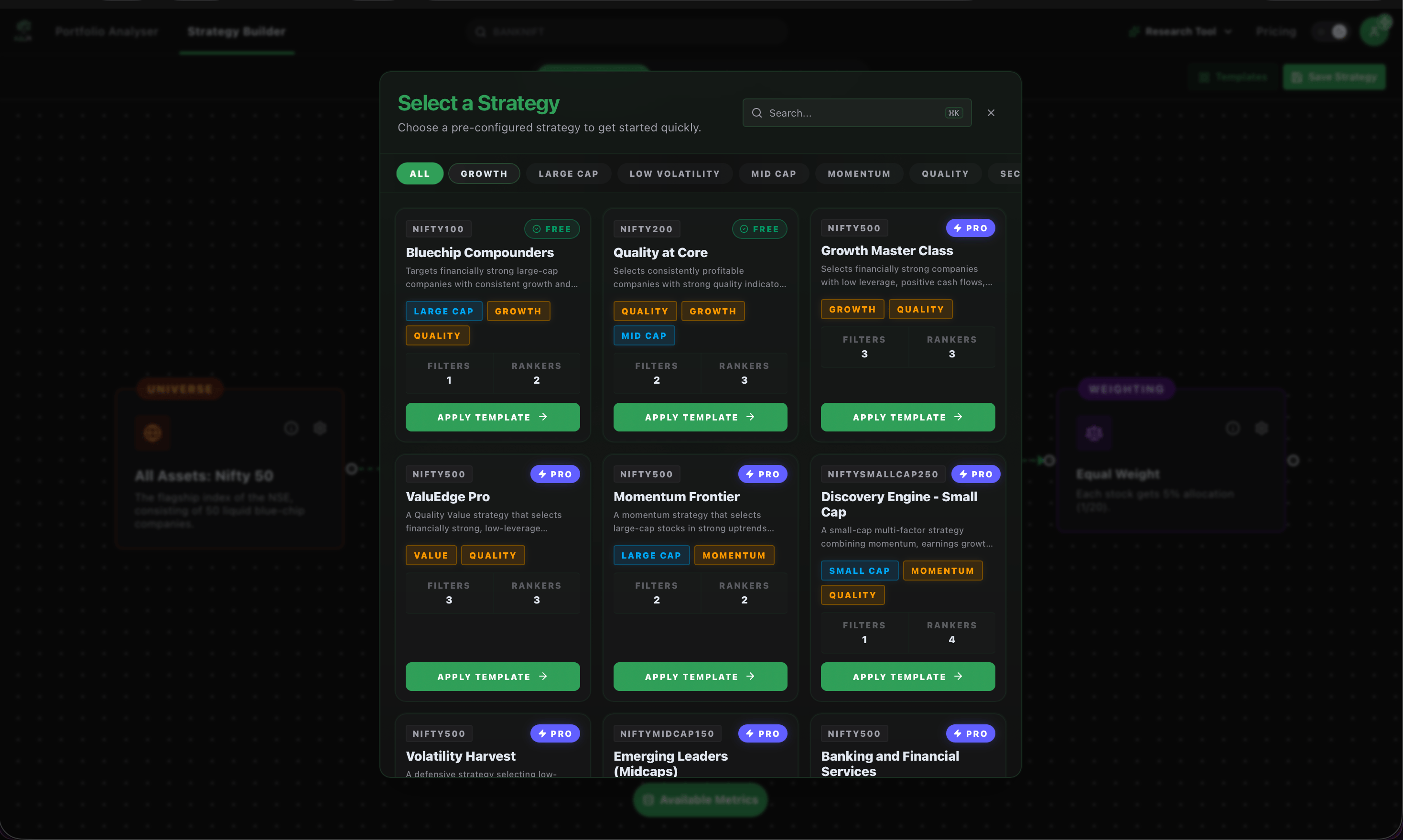
Navigate to the **Strategy Builder** and click the **Templates** button. Use the top navigation tags to filter strategies based on current market environments, including:
* **Momentum:** Strategies designed to capture ongoing market trends.
* **Low Volatility:** Baskets optimized for steady, risk-adjusted returns during turbulence.
* **Sectoral & Thematic:** Portfolios focused on specific industries (e.g., Defense, Banking) or macro trends.
* **Value & Quality:** Strategies targeting fundamentally strong, undervalued companies.
Find a strategy that fits your goals and click **Apply Template**. This will instantly load the strategy's exact DNA into your 4-step Portfolio Builder canvas.
Because the template loads directly into the builder, it is fully customizable. You can adjust the starting Universe, tweak the Filtration logic, or change the Weighting model to suit your personal risk appetite.
Click **Save Strategy** and give your portfolio a name. It will immediately appear in your **My Strategies** tab, complete with the generated stock list, exact quantities, and ideal weights. Simply click **Invest Now** to execute the trades via your connected broker.
**Total Transparency:** Every template shows you exactly how many Filters and Rankers are active right on the card before you even click apply.
***
Learn how to track, modify, and monitor your saved baskets in the My Strategies hub.
Understand the data behind the templates by learning how to read Win Rates and Max Drawdowns.
## The Template Workflow
Our templates are designed to be transparent. You don't just buy a "black box" strategy; you get to see exactly how the portfolio is built.
Navigate to the **Strategy Builder** and click the **Templates** button. Use the top navigation tags to filter strategies based on current market environments, including:
* **Momentum:** Strategies designed to capture ongoing market trends.
* **Low Volatility:** Baskets optimized for steady, risk-adjusted returns during turbulence.
* **Sectoral & Thematic:** Portfolios focused on specific industries (e.g., Defense, Banking) or macro trends.
* **Value & Quality:** Strategies targeting fundamentally strong, undervalued companies.
Find a strategy that fits your goals and click **Apply Template**. This will instantly load the strategy's exact DNA into your 4-step Portfolio Builder canvas.
Because the template loads directly into the builder, it is fully customizable. You can adjust the starting Universe, tweak the Filtration logic, or change the Weighting model to suit your personal risk appetite.
Click **Save Strategy** and give your portfolio a name. It will immediately appear in your **My Strategies** tab, complete with the generated stock list, exact quantities, and ideal weights. Simply click **Invest Now** to execute the trades via your connected broker.
**Total Transparency:** Every template shows you exactly how many Filters and Rankers are active right on the card before you even click apply.
***
Learn how to track, modify, and monitor your saved baskets in the My Strategies hub.
Understand the data behind the templates by learning how to read Win Rates and Max Drawdowns.